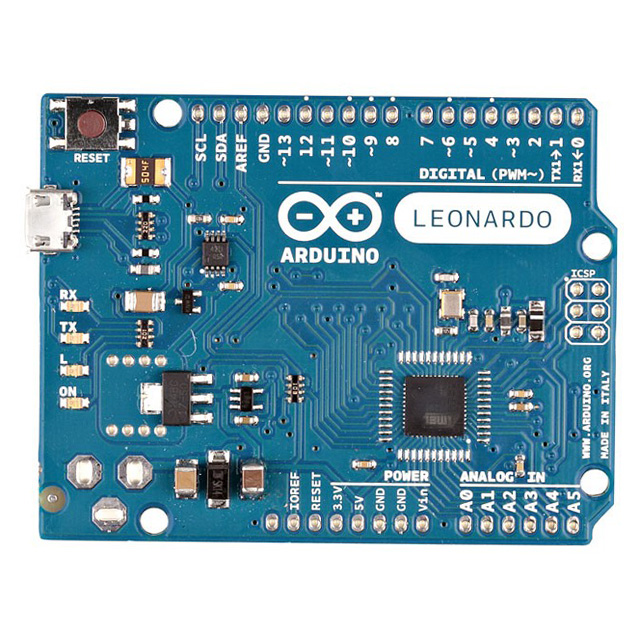
Q1: What is the Arduino A000056?
A: The Arduino A000056 is an Arduino UNO board, one of the most popular microcontroller development boards used by beginners and professionals alike. It is based on the ATmega328P microcontroller and provides a USB connection for programming and power. It also features 14 digital I/O pins, 6 analog inputs, and a variety of other I/O options that make it versatile for a wide range of projects.
Q2: What microcontroller is used in the Arduino A000056?
A: The Arduino A000056 uses the ATmega328P microcontroller, an 8-bit microcontroller with 32 KB of flash memory, 2 KB of SRAM, and 1 KB of EEPROM. This microcontroller is known for its reliability and ease of use in embedded applications.
Q3: How much flash memory does the Arduino A000056 have?
A: The Arduino A000056 features 32 KB of flash memory, which is used to store the code you upload to the board. Of this, 0.5 KB is used by the bootloader, leaving approximately 31.5 KB available for user programs.
Q4: How many digital input/output pins does the Arduino A000056 have?
A: The Arduino A000056 has 14 digital input/output pins. These pins can be used for both input and output, and 6 of them can provide Pulse Width Modulation (PWM) output, making the board suitable for controlling motors, LEDs, and other electronic devices.
Q5: How many analog inputs are available on the Arduino A000056?
A: The Arduino A000056 provides 6 analog input pins, labeled A0 through A5. These pins can be used to read analog signals, such as those from sensors or potentiometers, and convert them to digital values for processing in your program.
Q6: What is the operating voltage of the Arduino A000056?
A: The operating voltage of the Arduino A000056 is 5V, which is the standard voltage for most Arduino boards. It can also be powered through an external power supply or through the USB connection.
Q7: Can the Arduino A000056 be powered by a battery?
A: Yes, the Arduino A000056 can be powered by an external battery. You can use a 9V battery connected through the barrel jack or a regulated 5V supply connected directly to the 5V pin on the board.
Q8: How do you upload code to the Arduino A000056?
A: Code is uploaded to the Arduino A000056 via a USB connection. You can use the Arduino IDE (Integrated Development Environment) on your computer to write and upload code to the board. Once connected, the board automatically enters programming mode to accept the new code.
Q9: What communication protocols does the Arduino A000056 support?
A: The Arduino A000056 supports several communication protocols, including UART (Universal Asynchronous Receiver/Transmitter) via the serial interface, SPI (Serial Peripheral Interface), and I2C (Inter-Integrated Circuit), making it highly versatile for connecting to sensors, displays, and other devices.
Q10: Does the Arduino A000056 have a built-in LED?
A: Yes, the Arduino A000056 has a built-in LED connected to digital pin 13. This LED can be used for simple tests or debugging to indicate whether a program is running correctly.
Q11: What is the purpose of the reset button on the Arduino A000056?
A: The reset button on the Arduino A000056 is used to restart the microcontroller. Pressing this button will reset the board and allow it to begin executing the code from the beginning. This is useful for troubleshooting and testing.
Q12: Can the Arduino A000056 be used for motor control?
A: Yes, the Arduino A000056 can be used for motor control. It has PWM-enabled pins (3, 5, 6, 9, 10, and 11) that can be used to control the speed of motors, along with additional components like motor drivers or H-bridge circuits to control direction and speed.
Q13: How do I communicate with the Arduino A000056 over a serial interface?
A: The Arduino A000056 can communicate over a serial interface using the built-in UART via pins 0 (RX) and 1 (TX). The Arduino IDE allows you to send and receive serial data through these pins, which is useful for debugging or interacting with other devices.
Q14: What type of USB connection does the Arduino A000056 use?
A: The Arduino A000056 uses a standard USB-B connector for both power and programming. This is the same type of connection used by most printers and many other USB devices.
Q15: Can the Arduino A000056 be used with external shields?
A: Yes, the Arduino A000056 is compatible with a variety of external shields that can be stacked onto the board. These shields provide additional functionality, such as motor control, wireless communication, or display control, and are easily added to the Arduino platform.
Q16: How much SRAM is available on the Arduino A000056?
A: The Arduino A000056 has 2 KB of SRAM. This memory is used for storing variables and data during program execution. While it is limited, it is generally sufficient for most basic Arduino projects.
Q17: How many PWM pins are available on the Arduino A000056?
A: The Arduino A000056 has 6 pins that support Pulse Width Modulation (PWM) output. These pins are 3, 5, 6, 9, 10, and 11, and they can be used to control devices such as motors, LEDs, and servos.
Q18: What is the maximum current that the Arduino A000056 can supply on its I/O pins?
A: The maximum current that the Arduino A000056 can supply on its I/O pins is 40 mA per pin, with an overall maximum of 200 mA for the entire board. It is important not to exceed these limits to avoid damaging the board.
Q19: What is the role of the ATmega328P bootloader on the Arduino A000056?
A: The ATmega328P bootloader on the Arduino A000056 allows you to upload code to the microcontroller without needing a separate programmer. This bootloader makes it easy to program the board directly via the USB connection using the Arduino IDE.
Q20: Can the Arduino A000056 be used for IoT projects?
A: While the Arduino A000056 does not have built-in Wi-Fi or Bluetooth capabilities, it can still be used for IoT projects by adding external shields or modules, such as the ESP8266 Wi-Fi module or the HC-05 Bluetooth module. These add wireless capabilities to the Arduino board, enabling IoT applications.